
Direct Answer
GD&T, or Geometric Dimensioning and Tolerancing, is the standardized language used on engineering drawings and digital product definitions to control allowable variation in part geometry. It defines not only how large a feature may be, but how its form, orientation, location, profile, or runout may vary relative to the part’s functional references.
In U.S. mechanical design, ASME Y14.5-2018 (R2024) is the current ASME dimensioning-and-tolerancing standard. A good GD&T scheme begins with function: identify how the part is located in the real assembly, establish functional datums, select the geometric control that matches the failure mode, specify no more precision than the function needs, and verify that manufacturing and inspection can reproduce the requirement.
GD&T Symbols and Controls Quick Reference
Start with what needs to be controlled. The symbol identifies the geometric characteristic; the datum references, modifiers, and tolerance-zone definition determine how that control is interpreted.
| Category | Control | Datum Reference? | What It Controls | Typical Engineering Use |
|---|---|---|---|---|
| Form | Straightness | No | Variation from a straight line or, in applicable cases, a straight derived element. | Guide features, shafts, edges, or derived center elements where straightness matters. |
| Form | Flatness | No | Variation of a surface between two parallel planes. | Mounting pads, sealing surfaces, base plates, and bearing-support faces. |
| Form | Circularity | No | Roundness of individual circular cross-sections. | Rotating diameters, seals, bores, and precision cylindrical features. |
| Form | Cylindricity | No | Overall form of an entire cylindrical surface. | Bearing seats, precision bores, pistons, shafts, and sliding cylindrical interfaces. |
| Orientation | Parallelism | Usually yes | Orientation relative to a referenced datum without directly locating the feature. | Guide rails, opposing faces, bores, and assembly surfaces that must remain parallel. |
| Orientation | Perpendicularity | Usually yes | 90-degree orientation relative to a datum. | Mounting faces, holes, shoulders, bosses, and locating features. |
| Orientation | Angularity | Usually yes | Orientation at a basic angle other than 0 or 90 degrees. | Angled faces, holes, ramps, and interfaces defined by a basic angle. |
| Location | Position | Commonly yes | Location of a feature or pattern relative to basic dimensions and a datum reference frame. | Bolt holes, dowel holes, pins, slots, bores, and locating patterns. |
| Profile | Profile of a line | Depends on application | Variation of individual line elements from the true profile. | Cross-sectional contours and controlled 2D profile elements. |
| Profile | Profile of a surface | Depends on application | Variation of a 3D surface from its true profile. | Cast, molded, forged, aerodynamic, contoured, and complex machined surfaces. |
| Runout | Circular runout | Yes | Variation at circular elements while the part rotates about a datum axis. | Rotating sealing surfaces, bearing seats, hubs, and flange faces. |
| Runout | Total runout | Yes | Combined surface variation across the full controlled surface during rotation. | Precision rotating diameters and faces where overall surface behavior matters. |
Swipe horizontally to view all table columns.
Do not copy a GD&T symbol from an old drawing without confirming the governing standard and design intent. ASME Y14.5-2018 changed and reorganized several concepts from earlier editions, and ASME and ISO GPS practices should not be assumed interchangeable.
Standard basis: ASME Y14.5-2018 (R2024), Dimensioning and Tolerancing establishes the symbols, rules, definitions, requirements, defaults, and recommended practices used for ASME-based GD&T.
How to Read a GD&T Feature Control Frame
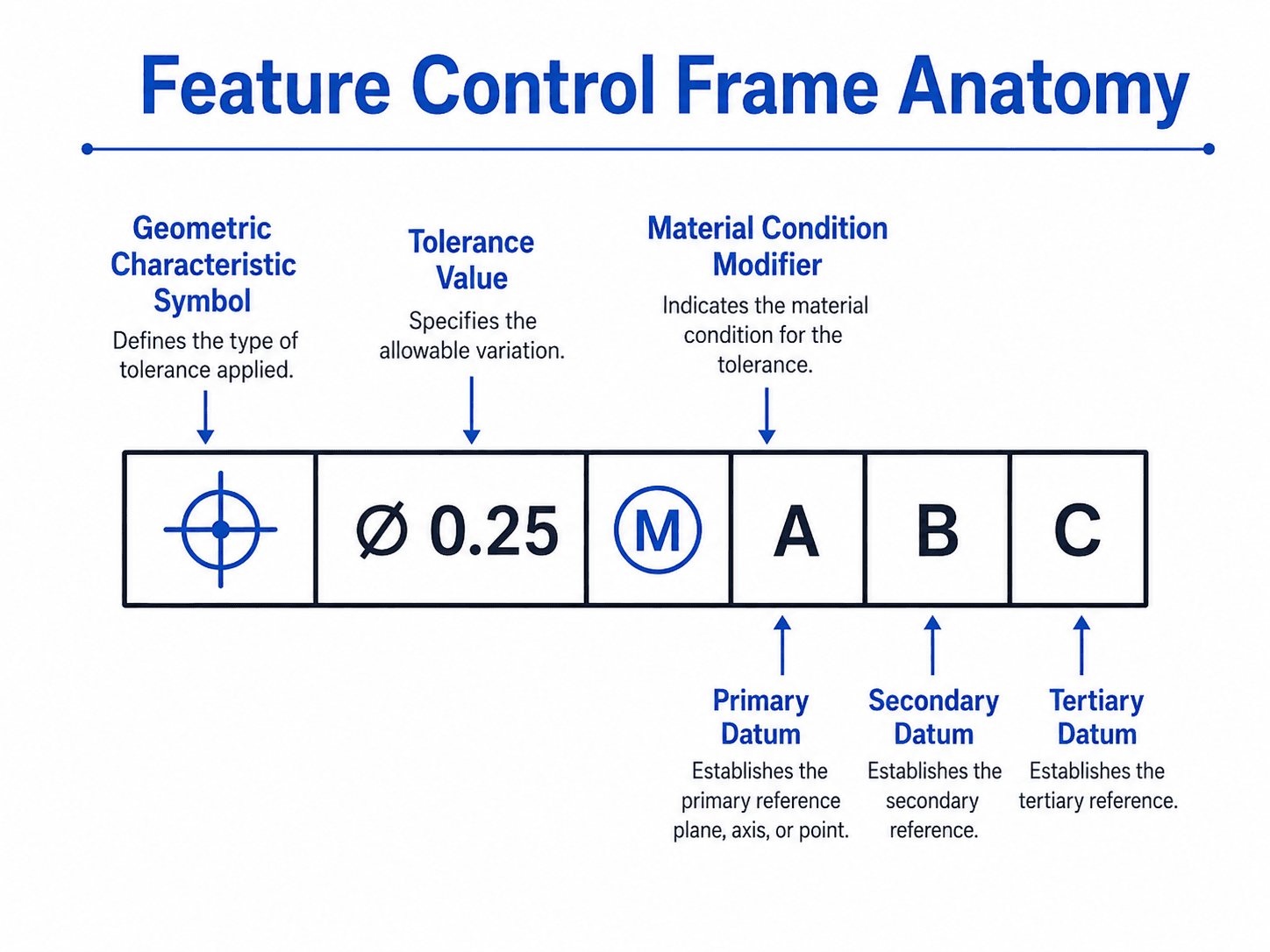
A feature control frame is a structured geometric requirement: read the characteristic first, then the tolerance-zone definition and modifiers, then the datum references in their specified order.
The frame must be interpreted together with the feature to which it is attached, the basic dimensions that define theoretically exact geometry, the drawing’s general notes, and the governing standard. The same tolerance value can mean something very different depending on the geometric control and tolerance-zone shape.
-
Identify the controlled feature.
Determine whether the frame applies to a surface, hole, pin, slot, pattern, axis, center plane, profile, or another feature. The controlled feature determines what element must remain inside the tolerance zone.
-
Read the geometric characteristic.
The first symbol states whether the drawing controls form, orientation, location, profile, runout, or another geometric requirement.
-
Interpret the tolerance zone.
Read the tolerance value together with symbols that define the zone. A diameter symbol, for example, indicates a cylindrical or circular tolerance-zone context where applicable.
-
Check modifiers.
Material-condition or boundary modifiers can change how the geometric tolerance behaves as feature size changes or how datum features are simulated.
-
Read datum references in order.
Primary, secondary, and tertiary references establish the sequence used to orient and locate the part. The order is part of the requirement, not decorative lettering.
-
Connect the callout to inspection and function.
Ask what bad geometry the requirement rejects, how the datum reference frame is established, and how the requirement can be verified in production.
Basic dimensions define theoretically exact geometry
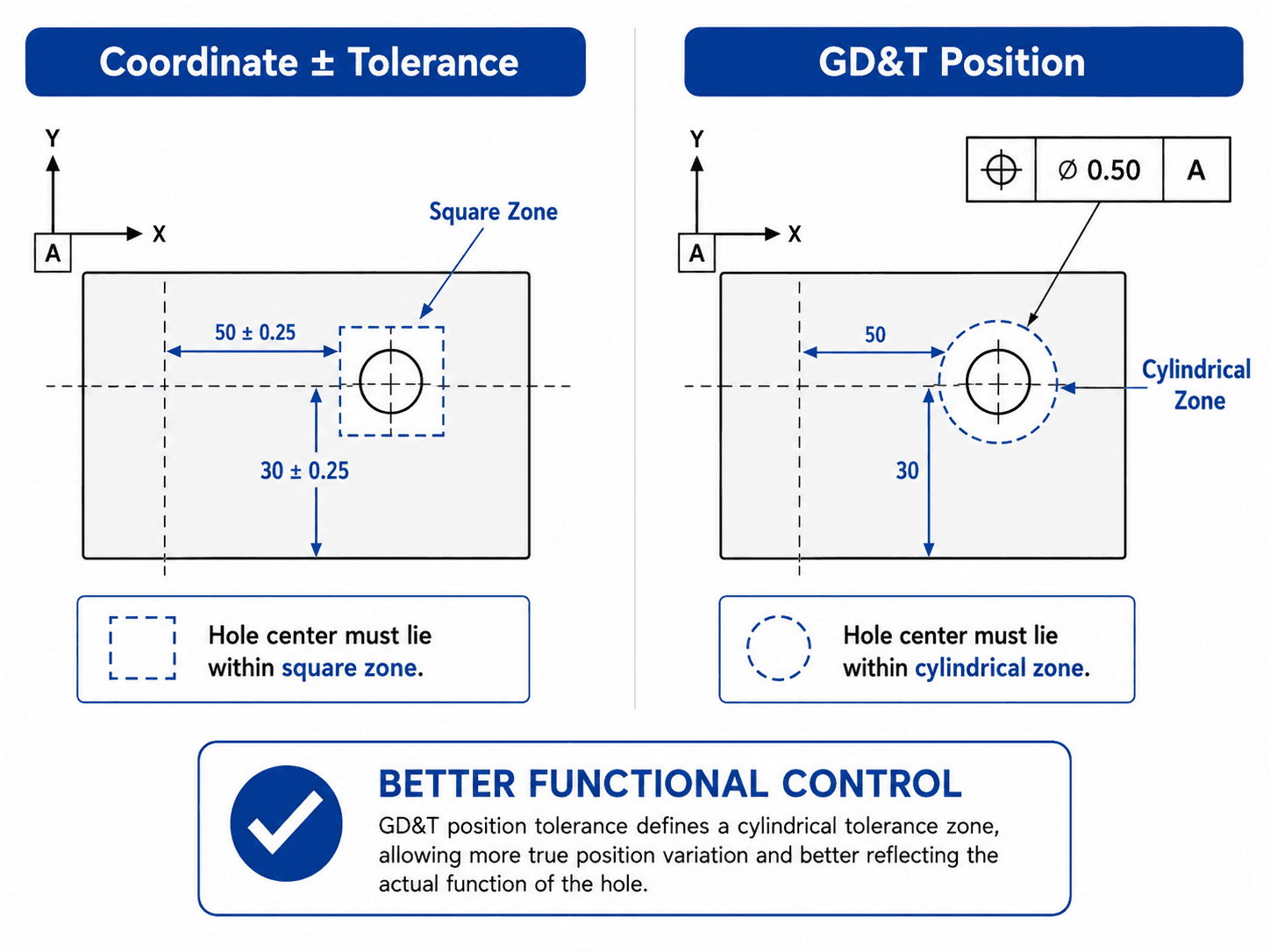
Basic dimensions establish theoretically exact size, location, orientation, or profile information associated with geometric controls. The permissible variation is then established by the geometric tolerance rather than by applying a separate plus/minus tolerance to that basic value.
GD&T does not replace all plus/minus tolerancing
Plus/minus limits remain useful for many size dimensions and noncritical linear requirements. GD&T becomes especially valuable when the engineering problem is geometric: a surface must be flat, an axis must be perpendicular, a pattern must locate relative to datums, or a rotating surface must control runout.
Datums and Datum Reference Frames
Datums create the theoretically exact reference framework used to orient and locate controlled geometry; datum features are the imperfect physical features on the manufactured part from which those references are established.
This distinction matters. A real mounting surface has flatness error, a real bore has form error, and a real slot has size and orientation variation. GD&T does not pretend those features are perfect. Instead, the datum rules establish theoretically exact references from physical datum features so the part can be interpreted and inspected consistently.
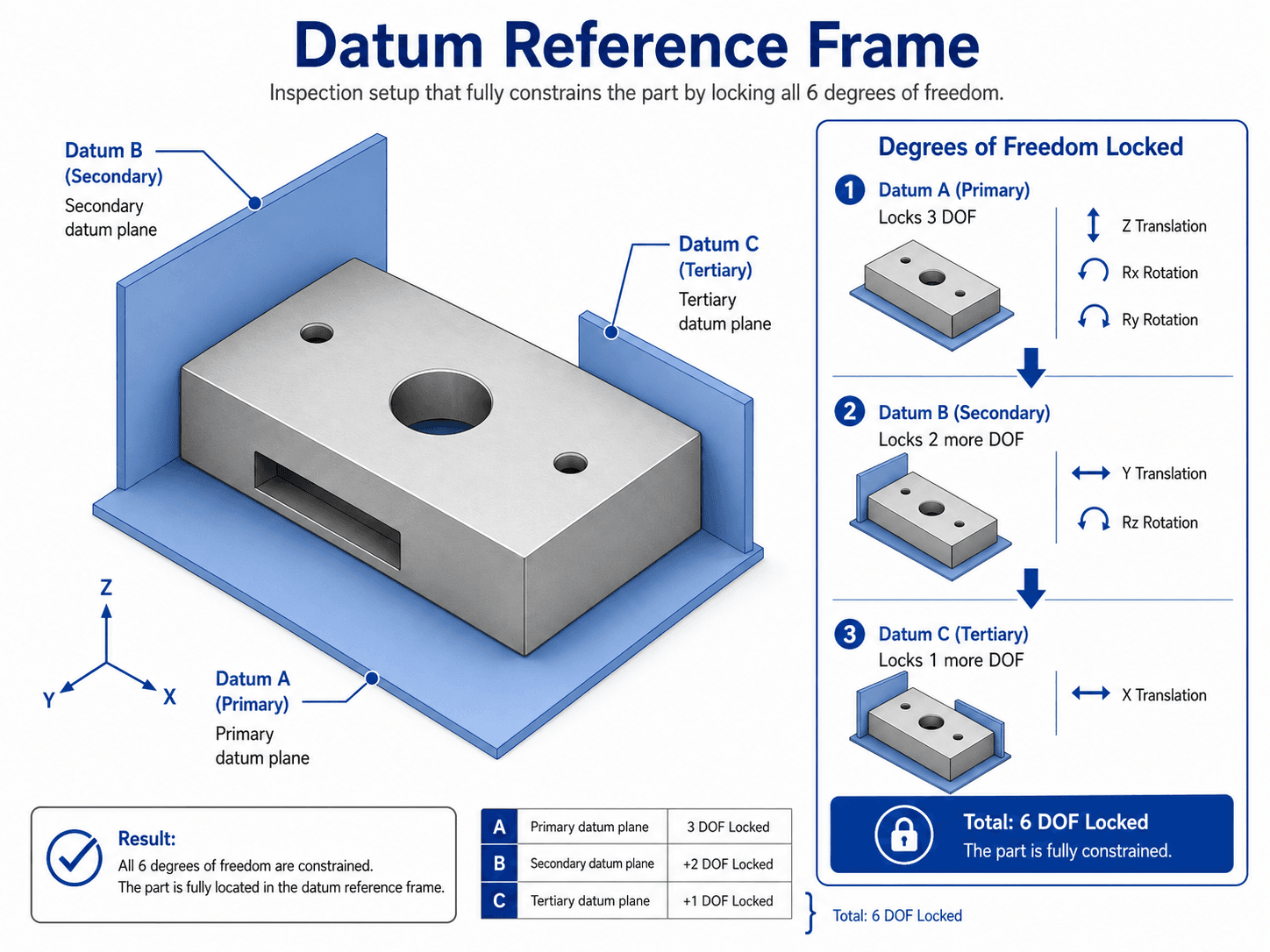
Primary, secondary, and tertiary datum order matters
The primary datum is established first, the secondary datum refines orientation or location next, and the tertiary datum completes the required reference framework. Changing A|B|C to B|A|C can change how the part is set up and how a geometric requirement is evaluated.
Choose datums from the way the product locates in service
Good datum features often correspond to the interfaces that physically locate the component: a mounting plane, locating diameter, slot, dowel pattern, bearing bore, or other repeatable interface. Selecting a large, convenient machined surface merely because it is easy to measure can create an inspection scheme that is repeatable but poorly correlated with assembly function.
Which feature contacts or locates first when the part is installed?
What translation or rotation must each datum feature constrain for the function being controlled?
Can manufacturing and inspection establish the same datum reference framework consistently?
Are the datum features sufficiently stable, accessible, and representative of the real interface?
If a part passes inspection from the drawing datums but can still be installed in a way that causes the controlled feature to misalign, revisit whether the datum scheme represents the functional setup.
Which GD&T Control Should You Use?
Choose the control from the functional failure mode, not from the appearance of the feature. First identify how geometric variation can cause failure, then select the control whose tolerance zone limits that variation directly.
| Functional Problem | Common Control to Evaluate | Why It May Fit | What to Verify | Common Misstep |
|---|---|---|---|---|
| A sealing or mounting face must not rock or leak. | Flatness or profile | Controls surface form rather than merely the distance between opposed features. | Whether orientation/location to another interface also matters. | Using only a size or thickness tolerance to control surface form. |
| A bolt or dowel pattern must assemble relative to locating interfaces. | Position | Controls feature location relative to basic geometry and functional datums. | Feature-of-size status, datum scheme, material modifiers, mating boundary, and pattern function. | Overly tight X-Y coordinate tolerances disconnected from assembly clearance. |
| A hole or shaft axis must remain square to a mounting face. | Perpendicularity | Controls angular orientation relative to the datum. | Whether the feature also needs a location control. | Assuming perpendicularity automatically fixes feature location. |
| A complex cast, molded, forged, or machined contour must stay within an envelope. | Profile of a surface | Can control an entire complex surface relative to true profile. | Datum references, profile distribution, applicable modifiers, and surface extent. | Replacing one clear profile requirement with many local coordinate dimensions. |
| A rotating surface must limit wobble relative to an axis. | Circular or total runout | Evaluates surface variation as the part rotates about a datum axis. | Whether local cross-section or full-surface behavior controls function. | Using a location concept alone when surface rotation behavior is the actual failure mode. |
| An individual surface must control shape without reference to another feature. | Form control | Flatness, straightness, circularity, and cylindricity control form without a datum reference. | Whether orientation or location is also functionally required. | Adding a datum to a pure form requirement simply because the part has datums elsewhere. |
Swipe horizontally to view all table columns.
Do not control the same functional error twice without a reason
Multiple geometric controls can interact. Before stacking separate controls onto the same feature, determine what each requirement adds. A stronger control may already constrain some of the variation addressed by a weaker control. Redundant requirements can confuse inspection and create unintended acceptance conflicts.
Tie the control to manufacturing reality
A technically valid tolerance can still be poor design if the selected process cannot hold it economically or if the inspection plan cannot reproduce it. GD&T should be reviewed with manufacturing as part of Design for Manufacturing, not added after the production method and drawing are effectively frozen.
Position, MMC, Bonus Tolerance, and Virtual Condition
Position is one of the most widely used GD&T controls for holes, pins, slots, patterns, and other features of size. To apply it correctly, distinguish the exact target from the allowed zone and separate feature size from feature location.
Worked example: position tolerance at MMC
Assume an instructional hole is specified from 10.00 mm to 10.20 mm with a position tolerance of ⌀0.20 mm at MMC. The actual measured mating size of the hole is 10.12 mm. These are example values used to demonstrate the arithmetic; they are not recommended design tolerances.
Find departure from MMC
For an internal feature controlled at MMC, the increase in actual hole size above MMC provides the size departure used for bonus tolerance.
Determine available position tolerance
Add the size departure to the stated position tolerance because the example position control is specified at MMC.
At 10.00 mm MMC, bonus tolerance is zero and the available position tolerance returns to the stated ⌀0.20 mm.
At the 10.20 mm upper size limit, the maximum size departure from MMC in this example is 0.20 mm.
This simplified example demonstrates one MMC relationship only. Datum-boundary effects, actual mating envelopes, pattern rules, projected zones, composite controls, and other ASME Y14.5 requirements can change a real evaluation.
“True position” is the theoretically exact target; position is the geometric control. Avoid calling the allowed tolerance value “true position tolerance” when explaining the requirement formally.
Functional Tolerancing, Inspection, and Manufacturing
A GD&T requirement is useful only when it protects function, is feasible for the manufacturing process, and can be verified through a repeatable inspection method.
Start with the functional failure
For every proposed control, state what happens if the geometry exceeds the limit. Does a bolt stop fitting? Does a seal leak? Does a bearing misalign? Does a shaft wobble? Does a surface interfere with a mating part? This prevents drawings from accumulating symbolic precision that has no measurable product value.
GD&T does not replace tolerance stack analysis
A feature can meet its individual geometric requirement while an assembly still fails because multiple dimensions and geometric variations accumulate. For clearances, fits, alignment, preload, travel, or other assembly-level outputs, connect the drawing to a Tolerance Stack Up Analysis.
Plan inspection before release
Inspection may involve a coordinate measuring machine, dedicated fixture, functional gauge, surface plate, dial indicator, optical system, or another method appropriate to the control. The inspection setup must establish the drawing’s datum framework and evaluate the required geometric characteristic consistently. Do not assume every valid GD&T callout is equally easy to verify with every measurement method.
Pass condition: The tolerance is traceable to assembly, motion, sealing, load transfer, appearance, interchangeability, reliability, or another explicit requirement.
Evidence: Interface analysis, tolerance study, test requirement, drawing rationale, or verified design criterion.
If it fails: Reconsider the control or tolerance magnitude before release.
Pass condition: The selected process and supplier can produce the requirement with an acceptable capability and process plan.
Evidence: Supplier feedback, capability data, process knowledge, prototype results, or manufacturing review.
If it fails: Change the process, feature definition, datum strategy, tolerance, or design.
Pass condition: The requirement can be measured repeatably from the intended datum setup.
Evidence: Inspection plan, gauge concept, CMM strategy, fixture definition, or agreed supplier method.
If it fails: Resolve accessibility, datum simulation, measurement uncertainty, or requirement definition.
Pass condition: The combined size and geometric variation still protects the mating or functional boundary.
Evidence: Worst-case analysis, statistical tolerance analysis where justified, functional gauge logic, fit analysis, or physical verification.
If it fails: Reallocate tolerances or redesign the interface rather than tightening every feature indiscriminately.
GD&T and manufacturability are connected. A perfectly legal drawing can still be expensive or unstable in production if it demands difficult setups, excessive process precision, inaccessible inspection, or datum features that do not align with manufacturing. Use the Design for Manufacturing guide to evaluate those process consequences before release.
GD&T Application Example: Locating a Bolt-Hole Pattern
Consider a machined mounting plate that seats against a base surface and is located laterally by two functional interfaces. A bolt-hole pattern must align with threaded holes in the mating structure. The exact dimensions are project-specific; the purpose of this example is to show the design reasoning.
- Define how the part locates: Use the mounting surface and real locating interfaces to establish the datum strategy. Do not start by choosing the easiest surfaces to probe on a CMM.
- Define theoretically exact hole locations: Use basic dimensions to establish the nominal location of the bolt-hole pattern relative to the datum reference framework.
- Select position because location controls assembly: The functional concern is whether the holes remain sufficiently close to their intended locations for the mating fasteners to pass through and engage.
- Decide whether a material-condition modifier is appropriate: If available clearance can legitimately be exchanged for geometric location error, position at MMC may support the functional requirement. If alignment must remain tight regardless of actual hole size, RFS or a different control strategy may be more appropriate.
- Check the full assembly boundary: Include mating fastener/pin sizes, hole sizes, geometric tolerances, relevant datum effects, and any other features that consume assembly clearance.
- Define inspection: Establish the same datum framework used by the drawing and verify the hole pattern using an appropriate measurement or functional-gauging approach.
The final position tolerance should come from the allowable assembly boundary and tolerance allocation—not from copying a familiar value such as 0.1 mm or 0.005 in from another drawing.
Senior Engineer GD&T Drawing Review Checklist
Use this checklist before a drawing or model-based definition is released. It is designed to catch the errors that create manufacturing cost, inspection disputes, and parts that pass the drawing but fail the assembly.
- Governing standard is explicit: The product definition clearly identifies the applicable ASME, ISO, customer, or company dimensioning-and-tolerancing practice.
- Functional interfaces are identified: The review team knows which surfaces, bores, holes, slots, pins, profiles, and assemblies control fit and performance.
- Datum features reproduce the real locating scheme: Datum selection is based on assembly/function and not merely convenient drawing geometry.
- Datum precedence is intentional: Primary, secondary, and tertiary order produces the desired orientation and location sequence.
- Each geometric control has a reason: The team can name the functional variation that the control limits.
- Tolerance-zone shape matches the failure mode: Planar, cylindrical, profile, runout, or other zone behavior reflects the actual geometric requirement.
- Basic dimensions are complete: The theoretically exact geometry needed to interpret the control is defined without redundant tolerancing.
- Feature-of-size status is correct: MMC, LMC, RFS, and related concepts are applied only where the standard permits and the function supports them.
- Bonus tolerance is intentional: Any size-dependent increase in geometric tolerance supports the real mating or boundary condition.
- Datum modifiers are understood: Material-boundary modifiers on datum references are not confused with bonus tolerance on the controlled feature.
- Controls are not redundant or conflicting: Multiple requirements on the same feature each add a necessary constraint and do not create incompatible acceptance conditions.
- Tolerances are manufacturable: Values reflect process capability, material, feature size, setup, equipment, production volume, and supplier reality.
- Inspection is defined conceptually: Quality can establish the required datum reference framework and evaluate the control repeatably.
- Tolerance stacks close: Critical clearances, fits, alignment, travel, preload, sealing, or other assembly outputs have been checked at system level.
- Legacy drawing conventions were not copied blindly: Obsolete, changed, or company-specific symbols and practices have been checked against the governing standard.
- Manufacturing and quality have reviewed critical callouts: High-risk requirements are resolved before release rather than during first-article inspection.
Stop the release when a critical callout cannot be tied to function, the datum scheme does not reproduce the intended interface, two qualified readers can reasonably interpret the requirement differently, the requirement cannot be inspected repeatably, or the selected manufacturing process cannot achieve it without unresolved risk.
For the broader workflow that connects requirements, CAD, analysis, drawings, prototyping, manufacturability, and verification, continue with the Mechanical Design Process.
GD&T Standards and Engineering References
This page is an educational design guide, not a replacement for the complete governing standard. ASME and ISO geometrical-tolerancing systems contain related concepts but should be applied using the standard specified by the drawing, customer, contract, or organization.
- ASME — Y14.5-2018 (R2024), Dimensioning and Tolerancing Current ASME Y14.5 edition and reaffirmation status. ASME identifies the standard as the authoritative guideline for its GD&T design language and states that it establishes symbols, rules, definitions, requirements, defaults, and recommended practices.
- ASME — Y14 Standards Current ASME Y14 product family and edition listing, including Y14.5-2018 and related product-definition standards.
- ISO — ISO 1101:2017, Geometrical product specifications (GPS) — Geometrical tolerancing ISO states that ISO 1101:2017 defines the symbol language and interpretation rules for geometrical specification and confirms that the 2017 edition remains current.
Frequently Asked Questions
What does GD&T stand for?
GD&T stands for Geometric Dimensioning and Tolerancing. It is a standardized symbolic language for specifying allowable geometric variation in engineering product definitions.
What is the current ASME GD&T standard?
As of August 2026, ASME lists Y14.5-2018 (R2024) as the current edition/status of its Dimensioning and Tolerancing standard. The 2018 edition replaced ASME Y14.5-2009.
What is the difference between a datum and a datum feature?
A datum feature is a physical feature on the manufactured part that is identified for establishing a reference. The datum is the theoretically exact reference—such as a plane, axis, or center plane—established from that physical datum feature under the governing rules.
What does MMC mean in GD&T?
MMC means maximum material condition. For an internal feature such as a hole, MMC is the smallest permitted size; for an external feature such as a pin or shaft, MMC is the largest permitted size. When a geometric tolerance is properly specified at MMC, departure from MMC can provide bonus tolerance under the applicable rules.
Is GD&T always better than plus/minus tolerancing?
No. Plus/minus tolerances remain appropriate for many size and simple dimensional requirements. GD&T is most valuable when function depends on form, orientation, location, profile, runout, datum relationships, or tolerance-zone behavior that ordinary coordinate dimensions do not communicate clearly.