
Mulch Calculator
Estimate mulch volume, cubic yards, bags, coverage, bulk order quantity, and project cost from landscape area and mulch depth.
Calculator is for informational purposes only. Terms and Conditions
Choose the estimate setup
Select the bed shape, dimension units, area display, and main answer format.
Enter the known values
Visible fields update based on the selected area method.
Solution
Live result, quick checks, warnings, and full solution steps.
Quick checks
- Check—
Mulch Estimate Visual Guide
This text-based visual avoids overlapping labels and summarizes the quantity flow.
Show solution steps See the equation, substitutions, assumptions, and result path
- Enter values to see the full solution steps and checks.
Source, Standards, and Assumptions
Calculation basis, constants, assumptions, and limitations.
This calculator estimates mulch as a uniform volume layer over a measured area. It is an educational construction quantity estimate and is not a landscaping specification.
- Assumptions will appear after a valid calculation.
On this page
Calculator Guide
How to Use the Mulch Calculator
The Mulch Calculator above estimates how much mulch you need from your landscape area and mulch depth. It converts the result into cubic yards, cubic feet, bags, bulk order quantity, coverage, and cost so you can decide how much to buy before starting the project.
For most landscape beds, the main calculation is simple: multiply area by additional mulch depth. The details that usually cause mistakes are unit conversions, old mulch already in place, irregular bed shapes, and rounding up for bags or bulk delivery.
Quick Answer
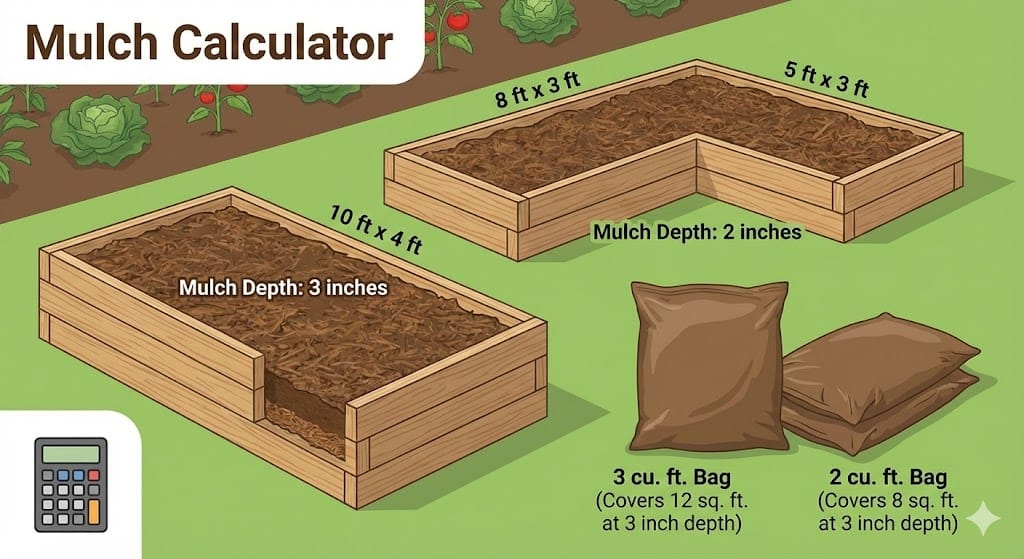
To calculate mulch manually, find the area in square feet, convert depth from inches to feet, then multiply area by depth. Convert cubic feet to cubic yards by dividing by 27. If buying bags, divide cubic feet by the bag size and round up.
When not to rely only on the estimate
Use this calculator as a material estimate, not as a plant-health or landscape-design guarantee. Final mulch needs can change with edging, slopes, soil grade, compaction, settling, existing mulch condition, supplier rounding, and site access.
Mulch Calculator Inputs and Outputs
The calculator needs a landscape area and an additional mulch depth. It can also use existing mulch depth, waste factor, bag size, bag price, bulk price, and delivery fee to estimate how much to purchase and what it may cost.
| Type | Value | What It Means | Common Unit |
|---|---|---|---|
| Input | Landscape area | The surface area that will receive mulch. This may come from length × width, known square footage, a circle, a tree ring, or a triangle. | ft² or m² |
| Input | Desired depth | The final mulch depth you want after spreading the material. | in, ft, cm, or mm |
| Input | Existing depth | The mulch depth already on the bed. This reduces the new mulch required for refresh projects. | in, ft, cm, or mm |
| Input | Waste factor | Extra material for uneven beds, irregular edges, settling, and measurement error. | % |
| Output | Mulch volume | The amount of mulch needed before supplier rounding. | ft³, yd³, or m³ |
| Output | Bags and cost | The number of bags to buy and a bagged-versus-bulk cost comparison when prices are entered. | bags and dollars |
Mulch Calculator Formula
The mulch formula treats mulch as a thin layer spread over a known area. The area controls how wide the layer is, while depth controls how thick the layer is.
Main Volume Formula
Where \(V\) is mulch volume, \(A\) is landscape area, and \(d\) is the additional mulch depth.
Depth Adjustment for Existing Mulch
If the existing mulch is already deeper than the target depth, the additional depth is treated as zero unless you choose a deeper final layer.
Tree Ring Area Formula
For a tree ring, \(R\) is the outer radius and \(r\) is the inner no-mulch radius around the trunk. Multiply the ring area by depth to get mulch volume.
Cubic Yard Conversion
One cubic yard equals 27 cubic feet, which is the standard conversion used for bulk mulch orders.
Bag Count Formula
The ceiling symbol means round up, because you cannot buy a fraction of a mulch bag.
What the Variables Mean
Each variable represents either a measured landscape dimension, a selected material depth, or a purchasing conversion. Correct units are the key to a reliable mulch estimate.
\(A\): Area
The surface area receiving mulch. For rectangles, \(A = L \times W\). For known square footage, enter the measured area directly.
\(d\): Additional Depth
The new mulch thickness being added. If you already have mulch, subtract existing depth from desired final depth.
\(V\): Volume
The total space filled by mulch. In U.S. units, square feet multiplied by feet of depth gives cubic feet.
\(R\) and \(r\): Tree Ring Radii
The outer radius defines the full ring. The inner radius defines the no-mulch opening around the trunk.
Waste Factor
A percentage added to the calculated volume to account for uneven spreading, bed edges, settling, and measurement error.
Bag Size
The volume in each bag. Common retail bag sizes include 1.5 ft³, 2 ft³, and 3 ft³.
How to Use the Calculator
Use the calculator by entering the shape or area of each bed, the final depth you want, and any existing mulch already in place. Then review cubic yards, bags, coverage, and cost before ordering material.
Choose the area method
Use rectangle for length × width beds, known area for measured square footage, circle for round beds, tree ring for mulch around trees, or triangle for corner beds.
Enter depth correctly
Enter the desired final depth and existing mulch depth. The calculator uses only the additional depth needed for the new material.
Add waste and purchasing details
Use 5–15% extra for most projects. Add bag size, bag price, bulk price, and delivery fee if you want a cost comparison.
Review the buying quantity
Use cubic yards for bulk delivery and bag count for retail bags. Round up because under-ordering usually causes more trouble than having a little extra.
How to Interpret the Results
The main result tells you how much mulch volume is needed. Cubic yards are best for bulk orders, cubic feet are best for bag conversion, and bag count tells you how many bags to buy.
What to do with cubic yards
Use cubic yards when ordering bulk mulch from a landscape supplier. Most users should round up to the supplier’s available order increment.
What changes the result most?
Depth has a direct effect. A 4-inch layer needs twice as much mulch as a 2-inch layer over the same area.
Sanity check
At 3 inches deep, 1 cubic yard covers exactly about 108 square feet. Some suppliers round this to about 100 square feet per yard to keep ordering simple.
What a suspicious result looks like
If a small flower bed shows several cubic yards, the depth may have been entered as feet instead of inches. If a large bed shows only one or two bags, you may have entered square inches, centimeters, or a missing bed area by mistake.
Input Checklist Before You Trust the Answer
Most mulch calculation errors come from measurement mistakes, mixed units, incorrect depth, or forgetting that existing mulch reduces the amount of new material needed.
Measure all beds
Include every bed, tree ring, island, and path that will receive mulch. Missing one bed can make the final order too low.
Use consistent dimensions
If dimensions are entered in feet, keep all bed dimensions in feet unless the unit selector is changed intentionally.
Check existing depth
For refresh projects, do not enter the full desired depth as new material if old mulch is still in place.
Confirm bag size
Retail bags commonly vary by volume. A 1.5 ft³ bag, 2 ft³ bag, and 3 ft³ bag produce different bag counts.
Handle irregular beds
Divide irregular beds into simple rectangles, triangles, and circles, then add the areas together. For curved beds, average width × length is often a practical estimate.
Inspect old mulch
If old mulch is thin and loose, include it as existing depth. If it is matted, sour-smelling, moldy, or too thick, rake or remove it before adding more.
Worked Example
This example shows how to calculate mulch for a rectangular bed when some old mulch is already present.
Step 1: Calculate area
Step 2: Find additional depth
Step 3: Calculate volume
Step 4: Add 10% extra and convert
Step 5: Convert to bags
Final answer
The project needs about 0.81 cubic yards, or 11 bags of 2 ft³ mulch. This is reasonable because the bed is 120 ft² and only needs 2 inches of new mulch.
Visual Planning Guide for Mulch Projects
Use the image below as a quick planning reference for the two most common workflows: estimating bags for a known bed size and estimating coverage from a known bulk volume. This replaces the earlier SVG diagram so the article uses your existing visuals instead of generated graphics.
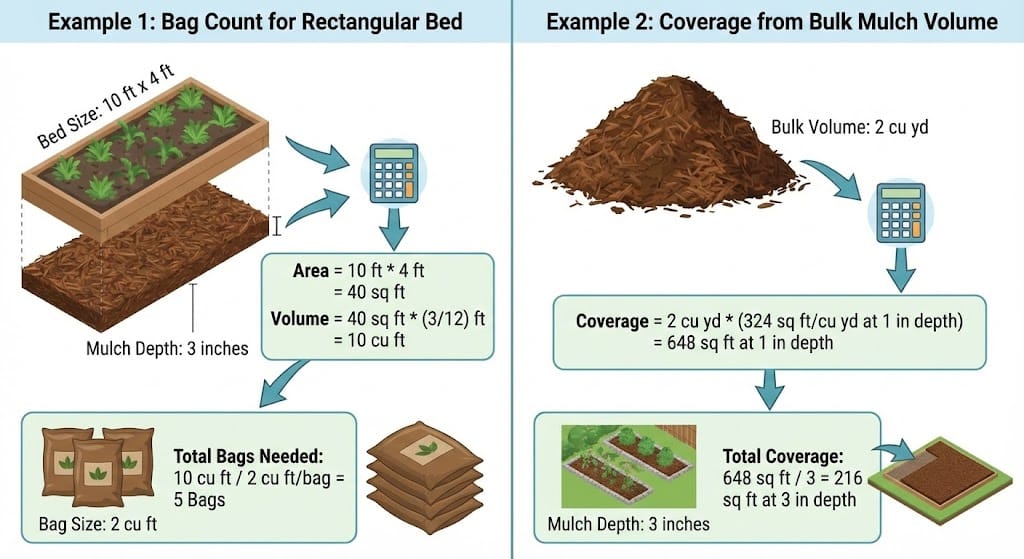
Rectangle beds
Use length × width to get area, then multiply by depth.
Tree rings
Calculate the outer circle, subtract the inner no-mulch circle, then multiply by depth.
Known area
If you already measured square footage, enter it directly and skip length-width geometry.
Reference Checks for Mulch Coverage
Coverage tells you how many square feet one cubic yard covers at a selected depth. This is one of the quickest ways to check whether a mulch estimate makes sense.
| Mulch Depth | Approximate Coverage | Best Use |
|---|---|---|
| 1 inch | 324 ft² | Light refresh or decorative touch-up |
| 2 inches | 162 ft² | Refresh layer or light new bed |
| 3 inches | 108 ft² | Common depth for many landscape beds |
| 4 inches | 81 ft² | Coarser mulch or heavier weed suppression where appropriate |
| Bag Size | Exact Bags per Cubic Yard | Rounded Buying Quantity |
|---|---|---|
| 1.5 ft³ | 18 bags | 18 bags |
| 2 ft³ | 13.5 bags | 14 bags |
| 3 ft³ | 9 bags | 9 bags |
Coverage Formula
For example, 3 inches equals 0.25 ft, so \(27 \div 0.25 = 108\text{ ft}^2\) per cubic yard. Some suppliers use about 100 ft² per yard at 3 inches as a conservative rounded ordering rule.
Practical Mulch Depth Ranges
Mulch depth is not just a math input. It affects weed suppression, moisture retention, plant health, and material cost.
Refreshing existing beds
Use about 1–2 inches of new mulch if a healthy layer already exists. Measure the old layer first so you do not overbuy.
Most new beds
About 2–3 inches is a practical target for many flower beds, shrub beds, and general landscaping areas.
Coarse mulch
Coarser bark or wood chips may be placed deeper in some applications, but avoid burying plant crowns or trunks.
Fine mulch
Fine mulch, compost, shredded leaves, or grass clippings may need a thinner layer because they can mat, compact, or restrict air and water movement.
Old mulch condition
If old mulch is loose and healthy, subtract it from the target depth. If it is matted, moldy, sour-smelling, or too thick, rake or remove it first.
Irregular beds
Break irregular beds into simple shapes or use average width × length for a practical estimate when the edge is curved.
Tree mulch warning
Around trees, shape mulch like a wide donut instead of a volcano. Keep mulch pulled back from the trunk so moisture is not trapped against the bark.
Units and Conversions
Unit consistency is the most important part of a mulch calculation. Square feet multiplied by feet of depth gives cubic feet, not cubic yards.
Depth conversion
Depth in feet is \( \text{inches} \div 12 \). A 3-inch mulch depth is \(3 \div 12 = 0.25\) ft.
Bulk conversion
One cubic yard equals 27 cubic feet. Divide cubic feet by 27 to estimate bulk mulch yards.
Metric conversion
One cubic meter equals about 35.3147 cubic feet. One liter equals about 0.0353 cubic feet.
Bag conversion
Bag count depends on bag volume. A 2 ft³ bag covers twice as much volume as a 1 ft³ bag.
Common unit trap
Do not multiply square feet by inches directly and call the result cubic feet. Convert inches to feet first, then multiply.
Bagged Mulch vs Bulk Mulch
Bagged mulch is convenient for small jobs, while bulk mulch is often better for larger projects. The calculator can compare both when bag price, bulk price, and delivery fee are entered.
Bagged mulch works well when…
- The project is small and only needs a few bags.
- You need easy transport and storage.
- You want a specific color, brand, or bagged product.
- You do not want a bulk pile dropped on the driveway.
Bulk mulch works well when…
- The project needs one or more cubic yards.
- You have several beds or a large landscaped area.
- Delivery is available and cost-effective.
- You can handle spreading material from a pile.
Bagged Cost
Bulk Cost
Common Mulch Calculation Mistakes
The most common mistakes are entering the wrong depth unit, forgetting existing mulch, undermeasuring irregular beds, or failing to round up the purchase quantity.
Do
- Convert depth from inches to feet for hand calculations.
- Measure every bed that will receive mulch.
- Use existing depth when refreshing old mulch.
- Round up bag count and bulk order quantity.
- Keep mulch away from tree trunks and plant stems.
Don’t
- Do not enter inches as feet.
- Do not ignore old mulch that is already on the bed.
- Do not use a single rectangle if the actual bed is much smaller or irregular.
- Do not buy partial bags without rounding up.
- Do not pile mulch against tree bark.
Troubleshooting Unrealistic Results
If the mulch estimate looks too high, too low, or impossible, check depth, dimensions, shape selection, and bag size first. These inputs usually cause the largest errors.
Result is too high
Depth may have been entered in feet instead of inches, or a dimension may have been entered in the wrong unit.
Result is too low
You may have forgotten a bed, used too shallow of a depth, or entered a square-foot area in the wrong unit.
Tree ring shows zero
The inner diameter may be equal to or larger than the outer diameter. The inner no-mulch circle must be smaller than the outer ring.
Bag count looks wrong
Confirm the bag size. A 1.5 ft³ bag requires more bags than a 2 ft³ or 3 ft³ bag for the same project.
Assumptions and Limitations
The calculator estimates material quantity using geometric volume. It does not account for every field condition, supplier practice, or product variation.
Simplified volume model
The calculator assumes mulch is spread at a roughly uniform depth over the entered area.
Material variation
Mulch volume, weight, moisture, texture, settling, and compaction can vary by product and supplier.
Ordering increments
Suppliers may require orders in whole yards or half-yard increments. Always confirm ordering rules before purchasing.
Plant-health judgment
Final depth should consider plant type, drainage, soil conditions, and tree-trunk clearance.
Calculation basis
This calculator uses standard geometric volume relationships and standard unit conversions: \(1 \text{ yd}^3 = 27 \text{ ft}^3\), \(1 \text{ ft} = 12 \text{ in}\), \(1 \text{ m}^3 \approx 35.3147 \text{ ft}^3\), and \(1 \text{ L} \approx 0.0353 \text{ ft}^3\).
Key Terms
These terms help connect the calculator inputs, formulas, and buying quantities.
Cubic Yard
A bulk volume unit equal to 27 cubic feet. Bulk mulch is commonly ordered in cubic yards.
Cubic Foot
A volume unit often used for bagged mulch. Bag sizes may be listed as 1.5 ft³, 2 ft³, or 3 ft³.
Coverage
The area a volume of mulch can cover at a selected depth.
Waste Factor
Extra material added to the estimate for uneven spreading, bed edges, settling, and measurement error.
Tree Ring
A donut-shaped mulch area around a tree, calculated by subtracting the inner circle from the outer circle.
Existing Depth
The mulch layer already present before adding new material.
FAQ
How much mulch do I need?
To estimate mulch, multiply the landscape area by the additional mulch depth, then convert the volume to cubic yards or bags. The calculator above does this automatically and can include waste factor, existing mulch depth, bag size, and cost.
How many bags of mulch are in a cubic yard?
One cubic yard equals 27 cubic feet. That is 18 bags at 1.5 cubic feet per bag, 13.5 bags at 2 cubic feet per bag, or 9 bags at 3 cubic feet per bag. Since partial bags cannot be purchased, round up.
How much does one yard of mulch cover?
One cubic yard covers about 324 square feet at 1 inch deep, 162 square feet at 2 inches deep, 108 square feet at 3 inches deep, or 81 square feet at 4 inches deep.
How deep should mulch be?
Use about 1 to 2 inches when refreshing existing mulch and about 2 to 3 inches for most new landscape beds. Around trees, keep mulch pulled back from the trunk instead of piling it against the bark.
Should I remove old mulch before adding new mulch?
Not always. If the old mulch is thin and healthy, measure the existing depth and add only enough new mulch to reach the desired final depth. Remove old mulch if it is matted, moldy, sour-smelling, or too thick.
How much extra mulch should I buy?
A 5 to 15 percent extra factor is usually practical for irregular bed edges, settling, uneven depth, and measurement error. The calculator above includes an extra or waste factor option.