
Direct Answer
The best electrical engineering projects are safe, measurable, and focused on a clear electrical concept such as sensing, amplification, power conversion, motor control, protection, filtering, communication, automation, or embedded systems. Strong projects include a schematic or block diagram, parts list, working prototype or simulation, measured test data, troubleshooting notes, and at least one documented improvement.
Good starting ideas include an LED dimmer, automatic night light, battery monitor, temperature-controlled fan, active filter, DC motor controller, robotic sensor system, solar charger, power-quality monitor, custom sensor PCB, PLC automation system, and wireless energy monitor.
How to Choose an Electrical Engineering Project
Choose a project that matches your skill level, available tools, time, safety limits, and the electrical concept you want to demonstrate.
Your category: circuits, electronics, embedded systems, power, controls, IoT, communications, PCB design, or testing.
A clear electrical requirement such as voltage range, current limit, response time, frequency, temperature threshold, accuracy, or power output.
You can build or simulate it safely, measure the important outputs, and explain the result in a report or portfolio.
- Step 1: Pick one core skill to show instead of trying to combine every electrical topic into one project.
- Step 2: Keep student builds at safe, low-voltage power levels unless a supervised lab specifically supports higher-energy work.
- Step 3: Define at least one measurable result before selecting parts.
- Step 4: Plan the schematic, test points, instruments, and documentation before the final build.
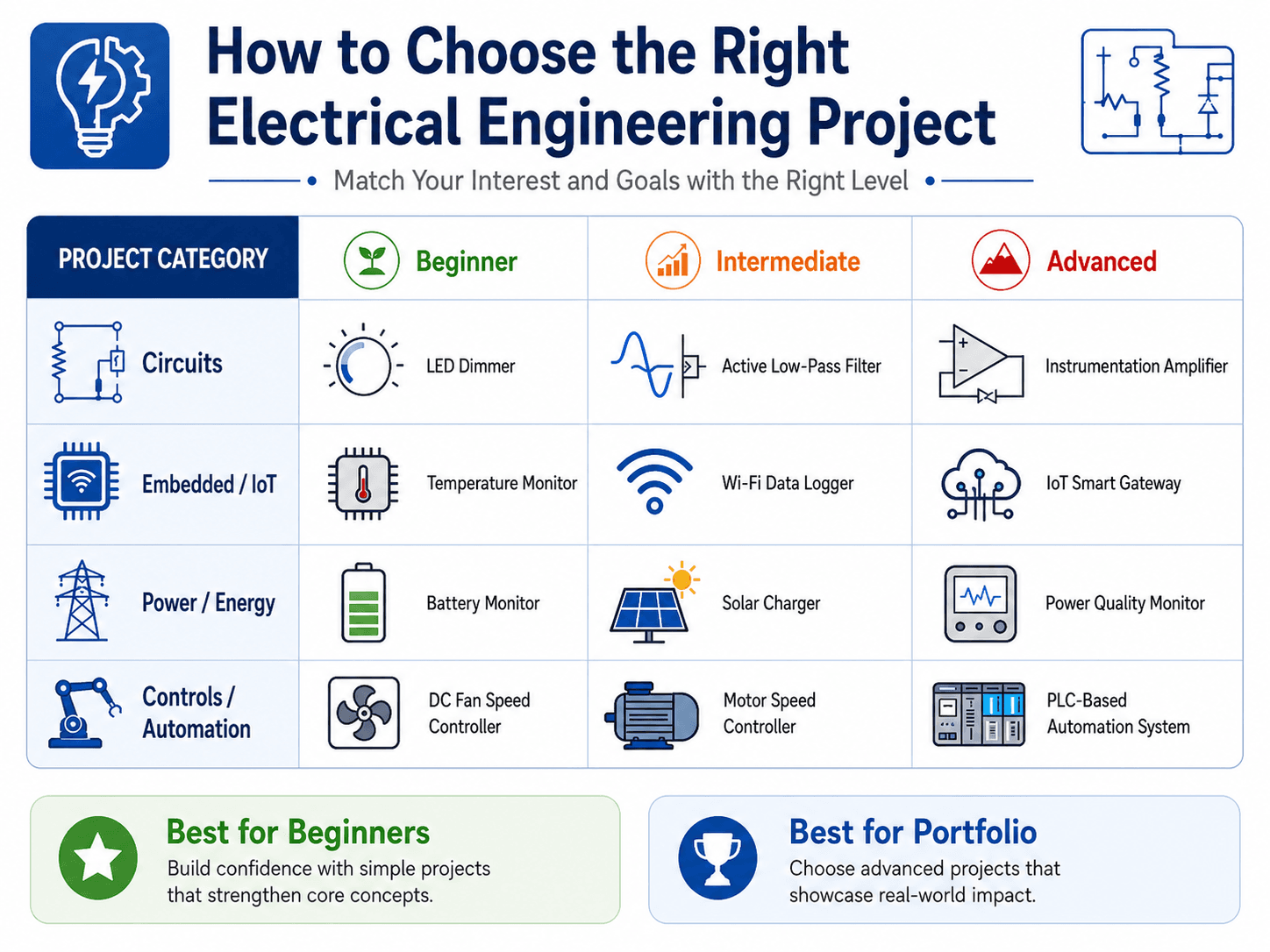
Key Takeaways
- Best beginner projects: LED dimmers, battery monitors, night lights, RC timers, comparators, and temperature-controlled fans.
- Best resume projects: Custom PCBs, motor controllers, sensor systems, power monitors, automated test rigs, and well-documented embedded projects.
- Best final-year projects: Solar MPPT demos, power-quality monitors, BMS prototypes, PLC automation, microgrid monitors, and protection projects.
- Best project rule: A simpler project with clean schematics and test data is stronger than a complex project that cannot be explained or validated.
Best Electrical Engineering Projects by Goal
Choose the idea based on what you want the finished project to prove.
| Goal | Best project choices | Skills demonstrated | Useful measurement |
|---|---|---|---|
| Best beginner project | Night light, LED dimmer, battery indicator, RC timer | Basic circuits, sensing, timing, switching | Voltage, current, threshold, time constant |
| Best mini project | Temperature fan, door alarm, rain detector, comparator | Sensors, outputs, driver stages, testing | Trigger point, current, response time |
| Best Arduino project | Data logger, motor controller, sensor dashboard, robot | Embedded hardware, code, sensors, actuation | Sample rate, motor speed, sensor error, repeatability |
| Best no-code project | Active filter, op-amp circuit, LED driver, regulator | Analog electronics, frequency response, power | Gain, cutoff frequency, regulation, current |
| Best power project | Solar charger, load monitor, power-quality monitor | Power measurement, conversion, protection | Voltage, current, efficiency, harmonics |
| Best resume project | Custom sensor PCB, smart meter, automated test fixture | Schematic, PCB, testing, documentation | Accuracy, efficiency, pass rate, repeatability |
| Best final-year project | MPPT controller, BMS demo, microgrid monitor, PLC system | System integration, controls, power, validation | Performance against defined requirements |
Swipe horizontally to view all table columns.
50 Electrical Engineering Project Ideas
These ideas cover circuits, analog electronics, embedded systems, IoT, power, controls, communications, PCB design, testing, renewable energy, and automation.
| Project idea | Category | Difficulty | Engineering evidence to collect |
|---|---|---|---|
| LED dimmer circuit | Circuits | Beginner | Duty cycle or resistance, LED current, brightness trend |
| Automatic night light | Circuits | Beginner | Light threshold, output current, switching behavior |
| Battery level indicator | Circuits | Beginner | Input voltage, indicator thresholds, current draw |
| RC timer circuit | Circuits | Beginner | Charge/discharge curve, time constant, output delay |
| Simple alarm circuit | Circuits | Beginner | Trigger condition, buzzer current, reset behavior |
| Clap switch | Analog electronics | Beginner | Microphone signal, threshold, false-trigger rate |
| Op-amp comparator | Analog electronics | Beginner–intermediate | Reference voltage, switching point, hysteresis |
| Active low-pass filter | Analog electronics | Intermediate | Gain vs. frequency, cutoff, phase trend |
| Audio amplifier | Analog electronics | Intermediate | Gain, output amplitude, clipping, load behavior |
| Instrumentation amplifier | Analog electronics | Advanced | Differential gain, offset, noise, common-mode response |
| Temperature monitor | Embedded systems | Beginner | Sensor reading, calibration error, display update |
| Temperature-controlled fan | Embedded / controls | Beginner | Turn-on temperature, fan current, hysteresis |
| Humidity data logger | Embedded systems | Intermediate | Sample interval, sensor drift, logged data |
| Bluetooth relay controller | Embedded systems | Intermediate | Range, switching delay, relay current, fail state |
| DC motor speed controller | Controls | Intermediate | PWM duty cycle, RPM, current, load effect |
| PID motor-control demo | Controls | Advanced | Setpoint response, overshoot, settling time |
| Line-following robot | Robotics | Intermediate | Sensor thresholds, path error, completion rate |
| Obstacle-avoidance robot | Robotics | Intermediate | Detection range, reaction time, success rate |
| Wi-Fi sensor dashboard | IoT | Intermediate | Packet delivery, sample rate, sensor accuracy |
| IoT smart gateway | IoT | Advanced | Latency, node count, data integrity, uptime |
| Smart energy meter prototype | Power / IoT | Advanced | Voltage, current, power, energy accuracy |
| Solar battery charger | Renewable energy | Intermediate | Input/output voltage, charge current, efficiency |
| MPPT charge-controller demo | Renewable energy | Advanced | Input power, output power, tracking efficiency |
| Power-factor correction demo | Power systems | Advanced | Real/reactive power, power factor before/after |
| Power-quality monitor | Power systems | Advanced | Voltage waveform, frequency, harmonics |
| Load monitoring system | Power / measurement | Advanced | Current, power, energy, logged load profile |
| Motor protection relay prototype | Power / controls | Advanced | Trip current, delay, reset, fault indication |
| Battery-management demo | Power electronics | Advanced | Cell voltage, temperature, alarm thresholds |
| Microgrid monitoring prototype | Power systems | Advanced | Source/load state, voltage, current, trends |
| PLC-based automation system | Automation | Advanced | Sequence timing, I/O states, error handling |
| Automatic sorting system | Automation | Advanced | Cycle time, detection accuracy, jam rate |
| Wireless sensor network | Communications | Advanced | Packet loss, range, latency, battery life |
| RF signal strength mapper | Communications | Advanced | RSSI, location, repeatability, coverage map |
| Custom sensor PCB | PCB design | Intermediate | Signal quality, current, connector function, test points |
| Microcontroller expansion board | PCB design | Intermediate | Power rails, pin mapping, I/O verification |
| Power regulator PCB | PCB design | Advanced | Line/load regulation, temperature, efficiency |
| Continuity and cable tester | Testing | Beginner | Detection accuracy, resistance threshold |
| Sensor calibration fixture | Testing | Intermediate | Calibration curve, repeatability, error |
| Automated electronics test jig | Testing | Advanced | Test time, pass/fail repeatability, coverage |
| Bench power-supply monitor | Testing / power | Intermediate | Voltage, current, logging accuracy |
| Signal generator demo | Electronics | Intermediate | Frequency, amplitude, waveform quality |
| Digital frequency counter | Embedded / measurement | Intermediate | Frequency error, input range, update rate |
| Capacitance meter | Measurement | Intermediate | Measured capacitance, calibration error |
| Light-intensity logger | Embedded / sensing | Beginner–intermediate | Lux trend, sample rate, calibration |
| Soil-moisture controller | Embedded / controls | Intermediate | Moisture threshold, pump runtime, sensor drift |
| Room-occupancy counter | Sensors / embedded | Intermediate | Count accuracy, false counts, latency |
| Low-voltage inverter demo | Power electronics | Advanced | Output waveform, frequency, efficiency |
| LED constant-current driver | Power electronics | Intermediate | LED current, thermal behavior, regulation |
| Current-limited DC supply | Power electronics | Advanced | Current limit, voltage regulation, thermal behavior |
| Smart load-shedding demo | Power / controls | Advanced | Load priority, response time, voltage/current states |
Swipe horizontally to view all table columns.
Beginner and Mini Electrical Engineering Projects
Beginner projects should use low voltage, common components, simple measurements, and one clearly visible electrical concept.
Automatic Night Light
Best fit: First sensor-and-switching project.
Tradeoff: Threshold may drift with component tolerance.
Measure: Turn-on light level and current draw.
LED Dimmer
Best fit: Learning current limiting and PWM.
Tradeoff: Direct LED drive must respect current limits.
Measure: LED current and duty cycle.
Battery Level Indicator
Best fit: Voltage division, comparators, indicators.
Tradeoff: Battery chemistry changes useful thresholds.
Measure: Input voltage vs. indicated level.
Temperature-Controlled Fan
Best fit: Sensor input plus output-driver stage.
Tradeoff: Fan current may exceed controller output capability.
Measure: Turn-on temperature, current, and hysteresis.
What makes a good mini project?
A mini project should still include a schematic, a clear function, one measured output, and a short explanation of what changed during testing. “It turns on” is not enough validation.
Final-Year and Capstone Electrical Engineering Projects
Strong final-year projects combine multiple subsystems, measurable requirements, system integration, testing, documentation, and a realistic safety plan.
| Project | Core focus | Measurable output | Scope control |
|---|---|---|---|
| Solar MPPT controller | Power electronics, control, renewable energy | Input/output power, efficiency | Use low-voltage hardware |
| Power-quality monitor | Measurement, harmonics, data acquisition | Voltage waveform, frequency, distortion | Use isolated safe measurements |
| Battery-management demo | Monitoring, protection, balancing concept | Cell voltage, temperature, alarm state | Use a small protected pack |
| Microgrid monitoring system | Power, controls, communications | Source/load states and trends | Use a low-voltage model |
| PLC automation project | Industrial controls, sensors, sequencing | Cycle time, state logic, fault recovery | Guard moving hardware |
| Motor protection prototype | Current sensing, protection logic | Trip threshold, delay, reset | Use a small motor |
| Wireless energy monitor | IoT, measurement, communications | Accuracy, sample rate, packet delivery | Limit monitored loads |
Swipe horizontally to view all table columns.
A focused project with a clear requirement and strong validation is usually better than an oversized system that spends the entire semester integrating purchased modules.
Arduino Projects and Electrical Engineering Projects Without Coding
Arduino can be useful, but a project does not need a microcontroller to demonstrate electrical engineering.
Then: Choose Arduino, ESP32, or another microcontroller project that includes sensor selection, driver circuits, power design, and testing—not copied code alone.
Then: Choose an op-amp, filter, regulator, LED driver, comparator, timing circuit, or analog measurement project.
Good Arduino project ideas
- Temperature and humidity data logger
- DC motor speed controller with feedback
- Wi-Fi sensor dashboard
- Line-following robot
- Smart energy monitor
- Automatic irrigation controller
- Sensor calibration station
Good electrical engineering projects without coding
- Active low-pass filter
- Op-amp comparator
- LED constant-current driver
- Voltage regulator
- Audio amplifier
- RC timer
- Battery level indicator
- Analog temperature alarm
Electrical Engineering Project Workflow
A reliable project moves from requirements to schematic, prototype, test data, troubleshooting, and documentation.
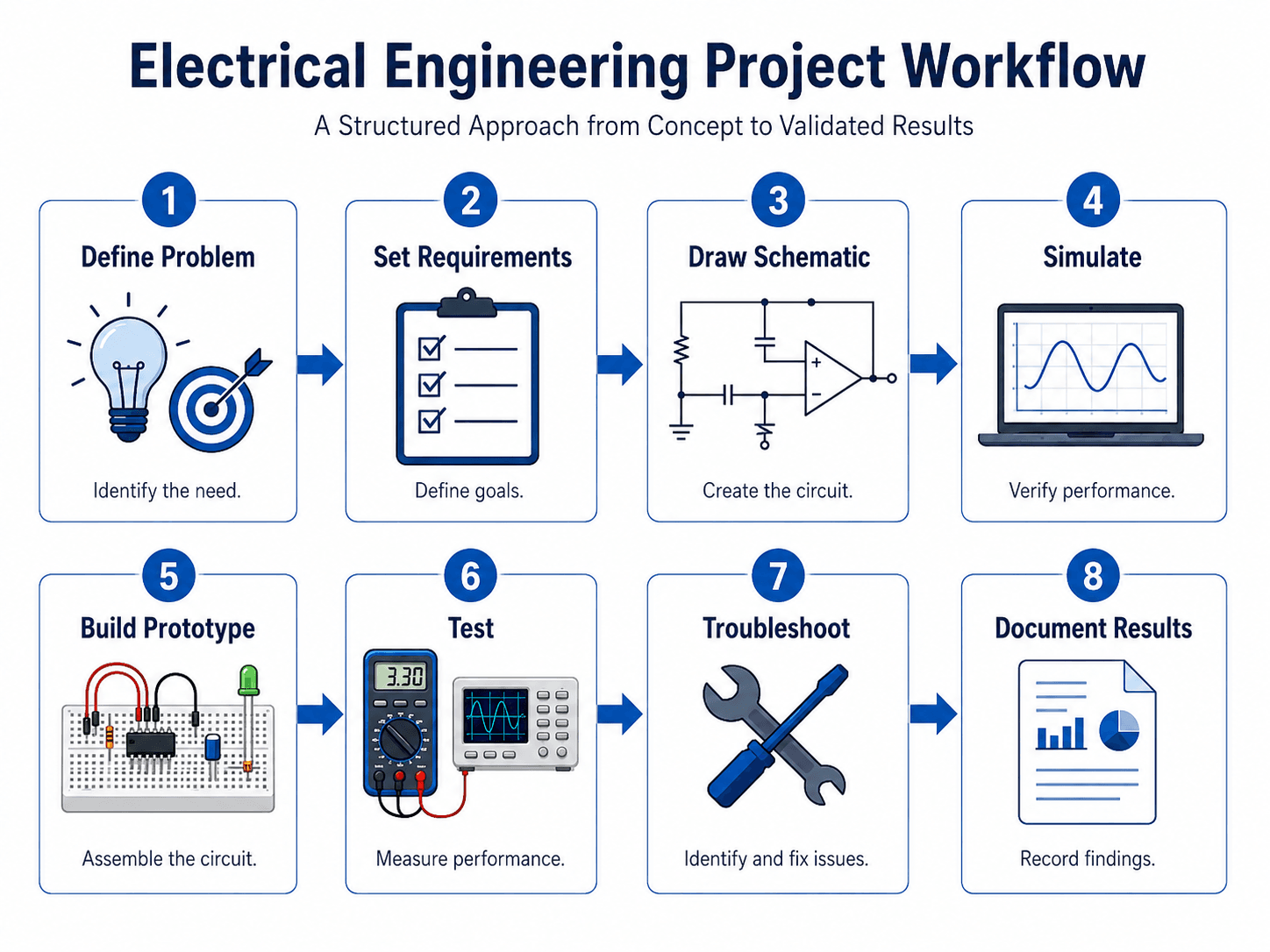
- Define the problem
State exactly what the system must sense, control, power, measure, communicate, or protect.
- Write requirements
Define voltage, current, response time, frequency, accuracy, temperature, output state, or other measurable limits.
- Create the block diagram and schematic
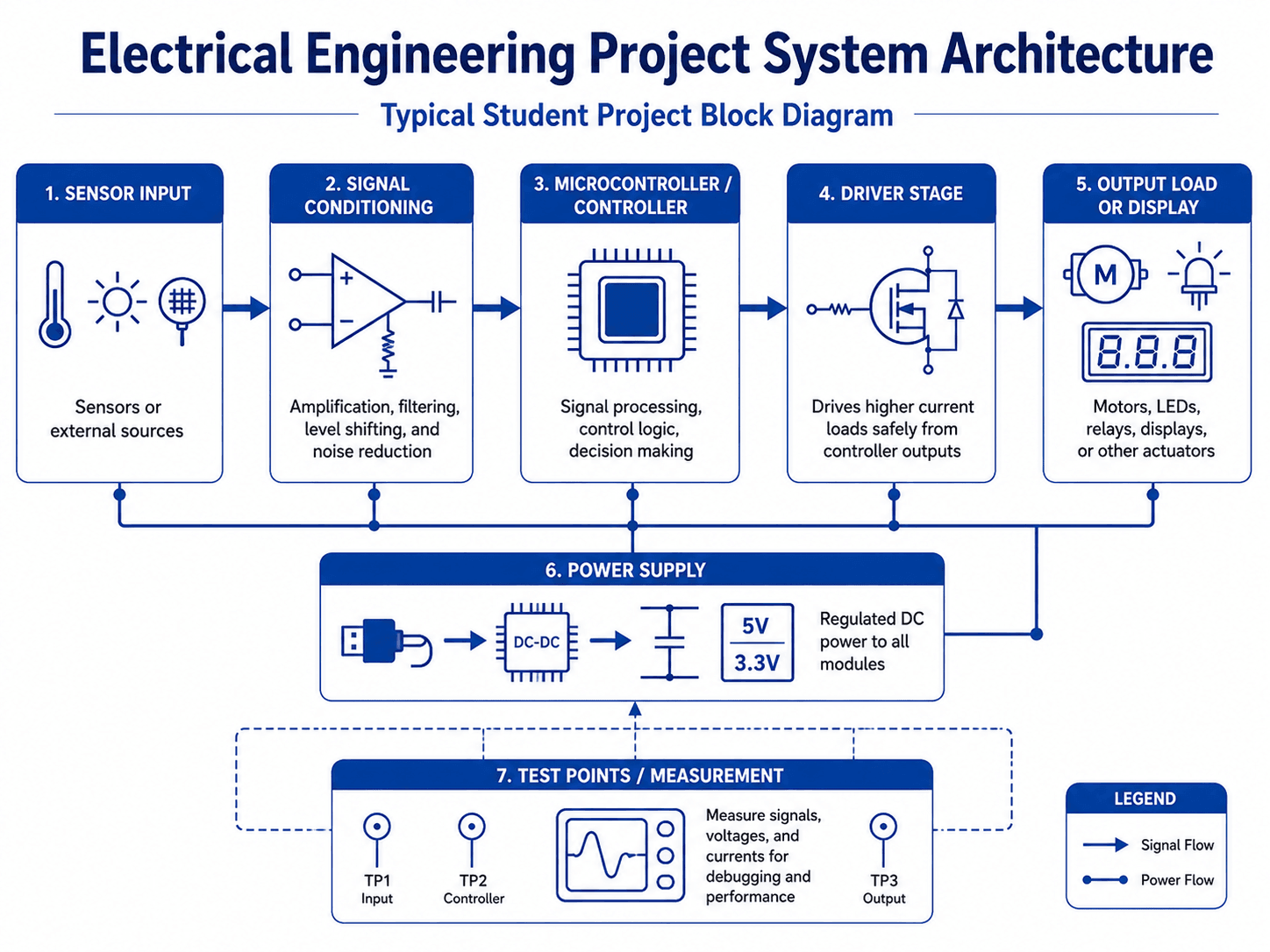
Separate input, conditioning, control, power, driver, output, and test points.
- Calculate or simulate
Check resistor values, gain, cutoff frequency, power, current, thermal limits, or control response as appropriate.
- Prototype by subsystem
Test power, sensor input, controller logic, and output driver separately before integrating the full system.
- Measure performance
Use a multimeter, oscilloscope, logger, or other instrument to compare actual behavior with requirements.
- Troubleshoot and improve
Record failures, determine causes, and document at least one design change.
- Document the final design
Include schematic, BOM, code if used, photos, test data, limitations, and lessons learned.
Electrical Engineering Project Report and Portfolio
A strong project report explains the requirement, design, measurements, troubleshooting, and final result—not just the finished device.
| Section | What to include | What it proves |
|---|---|---|
| Problem statement | What the project must measure, control, power, detect, or communicate | Scope clarity |
| Requirements | Voltage, current, accuracy, threshold, timing, or output behavior | Measurable success criteria |
| Block diagram | Input, conditioning, controller, driver, output, power supply | System-level understanding |
| Schematic | Connections, values, device ratings, test points | Actual electrical design |
| Bill of materials | Parts, quantities, ratings, important specifications | Component selection |
| Test procedure | Instrument setup, operating condition, pass/fail criteria | Validation discipline |
| Test data | Tables, plots, screenshots, measured values | Evidence |
| Troubleshooting notes | Failure symptoms, likely cause, fix, retest | Engineering judgment |
| Future improvements | PCB, enclosure, protection, calibration, efficiency, reliability | Design maturity |
How to make the project resume-ready
Use numbers. Replace “built a motor controller” with a result such as “designed and tested a PWM DC motor controller, measuring speed response and current draw across multiple duty-cycle settings.” Quantified bullets make the engineering contribution visible.
Include one failure or limitation. Explaining what did not work and how you corrected it often demonstrates more engineering maturity than showing only the final successful build.
Electrical Engineering Project Safety and Scope
For unsupervised student work, low-voltage and current-limited projects are usually the safest and most practical choice.
| Project area | Main risk | Safer direction |
|---|---|---|
| Mains voltage | Shock, arc, fire, exposed conductors | Use low-voltage DC or a supervised isolated lab setup. |
| Large batteries | Short circuit, heat, fire, high fault current | Use small protected cells, fusing, and current limits. |
| Motors | Stall current, heat, moving parts, electrical noise | Use a small motor, proper driver, and guarded mechanics. |
| Inverters / power conversion | Switching transients, stored energy, hazardous voltage | Use simulation or low-voltage educational hardware. |
| Capacitors | Stored charge and unexpected discharge | Use small values, discharge paths, and verify voltage before handling. |
Swipe horizontally to view all table columns.
Common scope failures
- Too many subsystems: Combining PCB design, mobile app, wireless link, power electronics, and mechanical packaging can overwhelm one semester.
- No measurable result: If the project cannot produce a voltage, current, frequency, accuracy, timing, temperature, waveform, or data output, it is hard to validate.
- Copied module assembly: Using modules is fine, but the project should still show schematic understanding, power design, test data, and troubleshooting.
- Testing only at the end: Verify power supply, sensor input, controller logic, and output driver independently before full integration.
If the idea requires exposed mains voltage, large battery packs, high current, or hazardous stored energy, reduce the scale or move the work into a properly supervised lab.
Common Electrical Engineering Project Mistakes
- Skipping the schematic: Photos show the build, but the schematic shows the electrical design.
- Ignoring current draw: Motors, relays, LEDs, radios, and sensors can exceed controller or regulator limits.
- Driving loads directly: Microcontroller pins often need a transistor, MOSFET, relay driver, or dedicated motor driver.
- Poor grounding and power distribution: Many unstable projects are really power or grounding problems.
- No calibration: Sensor-based projects should compare measured values with a known reference when possible.
- No iteration: A strong project should show at least one change driven by test evidence.
Electrical Engineering Project References
The project framework on this page emphasizes problem solving, engineering design, experimentation, communication, teamwork, and engineering judgment.
- ABET — Criteria for Accrediting Engineering Programs, 2026–2027 Current engineering student outcomes include solving complex engineering problems, applying engineering design, conducting experiments, analyzing data, communicating, teamwork, and making informed engineering judgments.
- Turn2Engineering — Prototyping in Electronics Companion resource for moving from schematic and breadboard to refined electronic hardware.
Frequently Asked Questions
What are the best electrical engineering projects for beginners?
Good beginner projects include an LED dimmer, battery monitor, automatic night light, RC timing circuit, comparator, temperature-controlled fan, door alarm, and simple DC motor controller. Keep the voltage low and make at least one output measurable.
What are good final-year electrical engineering projects?
Strong final-year projects include a solar MPPT controller, power-quality monitor, battery-management demo, microgrid monitor, smart energy meter, PLC automation system, motor-protection prototype, or wireless energy-monitoring system.
Are Arduino projects good for electrical engineering students?
Yes, when the project includes real electrical engineering: sensor interfaces, power design, motor or relay drivers, circuit protection, measurements, and troubleshooting. Copied code with no circuit understanding has much less portfolio value.
Can electrical engineering projects be done without coding?
Yes. Analog filters, op-amp comparators, LED drivers, voltage regulators, amplifiers, battery monitors, timing circuits, sensor alarms, and power-supply experiments can all be strong projects without programming.
What electrical engineering projects look good on a resume?
The best resume projects show a schematic, calculations or simulation, component selection, a prototype or PCB, measured test data, troubleshooting, and a quantified result. Custom PCBs, motor controllers, test fixtures, power monitors, and sensor systems work especially well when documented thoroughly.
How much should an electrical engineering student project cost?
Many beginner projects can be completed for under $50 using a breadboard, low-voltage supply, common components, and a multimeter. Spend money on safe power supplies and useful measurement tools before adding unnecessary complexity.
Choose Your Electrical Engineering Project
Start with one electrical concept you want to demonstrate, keep the scope safe and realistic, and define measurable requirements before buying parts.
If you can explain the schematic, build or simulate the design, measure the key outputs, troubleshoot a failure, and document one improvement, you have the foundation of a strong electrical engineering project.